

Most of what I automate isn’t clever. It’s the work I’d forget: checking whether my notes have drifted from the code, sweeping for plans nobody has touched in weeks, pulling together what changed across the tools a project lives in. So I hand those to routines, and the routines run on a schedule whether I’m looking or not.
Today that’s nine routines, and they’ve written well over a hundred reports so far. Here’s how they’re built, and the two rules that keep them from lying to me.
What runs, and when
| Routine | Cadence | What it hands back |
|---|---|---|
| Review digest | daily | pull requests and build checks waiting on me |
| Tool-release digest | weekly | what changed in my AI tools this week, and which of my rules it affects |
| Context audit | weekly | notes and instructions that no longer match the code |
| Context check | weekly | gaps and drift across the setup’s own instructions |
| Stale-plan sweep | weekly | plans with no activity, so I close or revive them |
| Memory health | weekly | duplicate, outdated or oversized notes |
| Evals report | weekly | how my own checks are scoring |
| Research loop | twice a week | one question answered against a vetted source list, every claim linked |
| Project watch | twice a week | anything said, filed or shipped about one project since the last run |
The tool-release digest is the one I’d keep if I could only keep one. My tools ship changes every few days, and it reads the release notes against my own setup: this new option makes one of my rules enforceable, that one works against another. It’s how the setup keeps up instead of going stale.
Each one is a short written brief, the same way a skill is: what to read first, what to check, where to write, and what it must never do.
The catch-up job
A laptop sleeps. A routine scheduled for 9 a.m. on a closed laptop just doesn’t happen, and nothing tells you.
So there’s one more job. Every time the machine wakes, it checks each routine’s last report. Fresh, it skips it. Stale or missing, it runs it now.
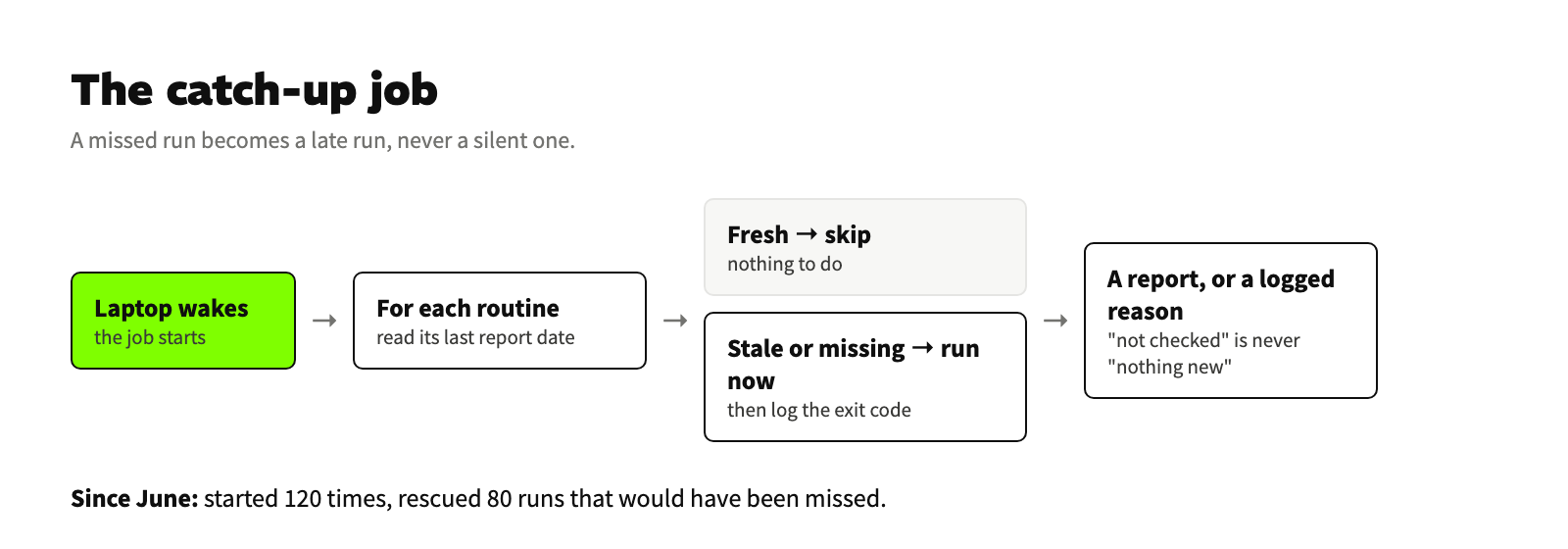
Since June it has started 120 times and rescued 80 runs that would otherwise have been missed without a trace. That’s the whole value of it: a missed run becomes a late run, never a silent one.
Two rules every routine follows
Read everywhere, write in one place. A routine reads the tracker, the docs, the meeting notes, the code history. It writes only to its own report folder. It never comments, never sends, never edits a shared file, never signs in to anything. If a finding needs action, the action is mine.
“Couldn’t check” is not “nothing new.” If a source fails, because a login expired or a service is down, the report says that source was not checked, and why. It’s never folded into “no news.” This rule came from a real miss. A big automated review of mine once reported that none of its findings held up, when most of its checkers had simply run out of budget and returned nothing. A missing answer had been counted as a “no.” I don’t let a routine do that anymore.
The packager that refuses to ship
Two teammates asked for my setup. Handing it over meant packaging 89 files that were written for me, about my work, and scrubbing them first.
The packager does three things in order:
- Copy only the files on an explicit list. Nothing comes along by accident.
- Scrub with exact matches, not loose patterns. A loose pattern either misses a name or mangles the instructions around it.
- Scan the finished package for anything private that survived. One hit, and there’s no zip. It stops and names the file and line.
It’s the same idea as the routines. The safe outcome is the default, and the risky one needs a clean result to happen.
It wasn’t perfect. One delivered copy had a budget guard that never fires. I found that later, and it’s on my list. It’s also the reason I don’t claim team adoption yet: two kits are out, and I haven’t counted how they’re used. That’s the next number.
What this adds up to
None of these routines is impressive alone. Together they mean the boring checks happen on time, a missed run shows up as missed, and nothing goes out the door without a clean scan. That’s the bar for automation I’d trust on a team: it does the work, it says when it couldn’t, and it never acts for me.
Thanks for the read.